

SMS OPT-IN WORKFLOW
How Wouldn't Miss It collects consent before sending text messages
This page documents, end to end, how a Wouldn't Miss It user opts in to receive SMS event reminders. It exists so that mobile carriers, messaging aggregators, and anyone reviewing our messaging program can see the exact consent language and screens a user encounters, without needing an account.
Every point below reflects the live product. The disclosure and consent text quoted on this page is rendered from the same source module the application uses, so it cannot drift out of sync with what users actually agree to.
1. PROGRAM DETAILS
- Brand
- Wouldn't Miss It
- Legal entity
- Wouldn't Miss It LLC, a Nevada limited liability company
- Program type
- Transactional — customer care / notifications
- Sender
- Toll-free number
- Use case
- Transactional reminders for the events you have saved in your account — birthdays, anniversaries, and other dates you choose to be reminded about.
- Message frequency
- Varies based on the reminders the user configures.
- Cost
- Message and data rates may apply.
- Supported countries
- United States and Canada
- Support
- info@wouldntmissit.com
- Mailing address
- 5150 Mae Anne Ave, Ste 405, PMB 3070, Reno, NV 89523, United States
We do not send marketing or promotional text messages, and we do not sell, rent, or share mobile numbers. No mobile information is shared with third parties or affiliates for marketing or promotional purposes. Text messaging originator opt-in data and consent are never shared with third parties.
2. THE OPT-IN WORKFLOW
SMS is never enabled by default. A user reaches the messages below only by completing every step in order.
- 1
Create an account
A user signs up with an email address or Google account. No phone number is requested and no SMS consent is collected at this stage, so creating an account never results in a text message.
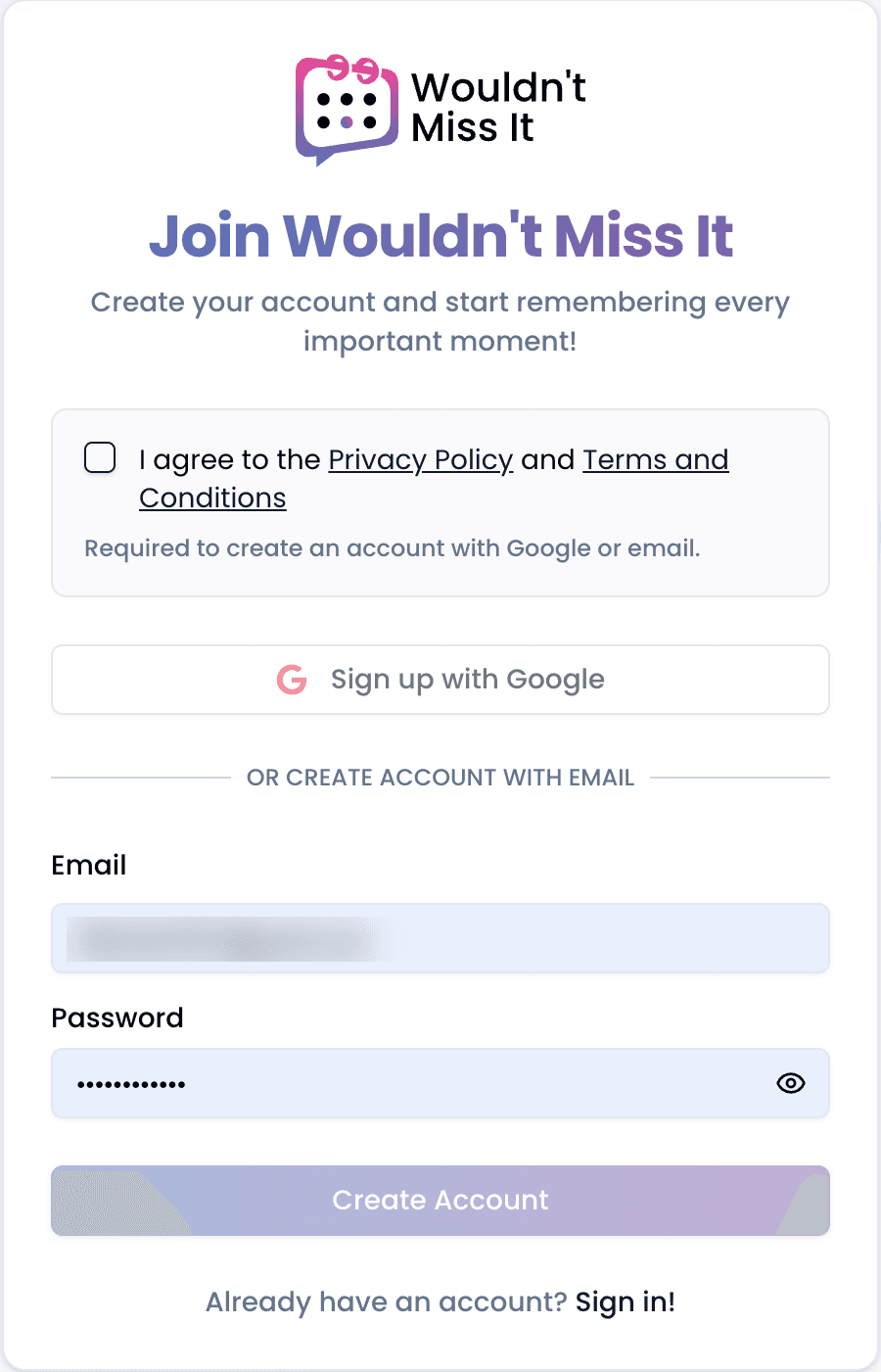
Sign-up collects no phone number and no SMS consent. - 2
Choose to enable SMS reminders
From account settings, the user opts to add a phone number. The SMS notifications toggle cannot be enabled until a phone number has been verified through the flow below.
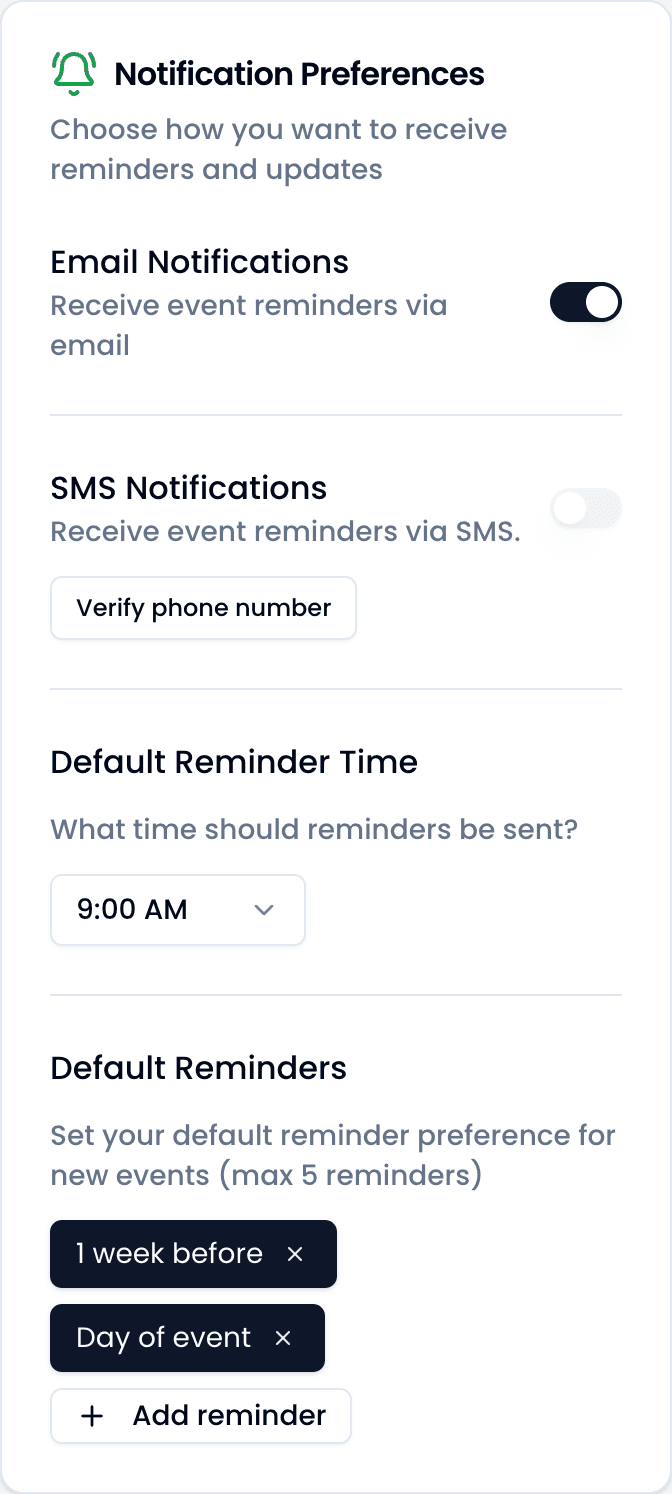
SMS notifications in account settings, before a number is verified. - 3
Give express consent
The user enters a mobile number and must tick 4 separate, individually unchecked boxes. None are pre-selected, none are bundled together, and the button that sends a message stays disabled until every one of them is ticked:
- I agree to the Privacy Policy and Terms and Conditions
- I consent to receive verification codes by text message
- I consent to receive text messages related to events in Wouldn't Miss It
- I understand I can opt out at any time
The following disclosure is displayed on this screen, immediately beneath the checkboxes:
Wouldn't Miss It sends event reminders and verification codes. Message frequency varies based on the reminders you configure. Standard message and data rates may apply. Reply HELP for help or STOP to cancel at any time. Carriers are not liable for delayed or undelivered messages.
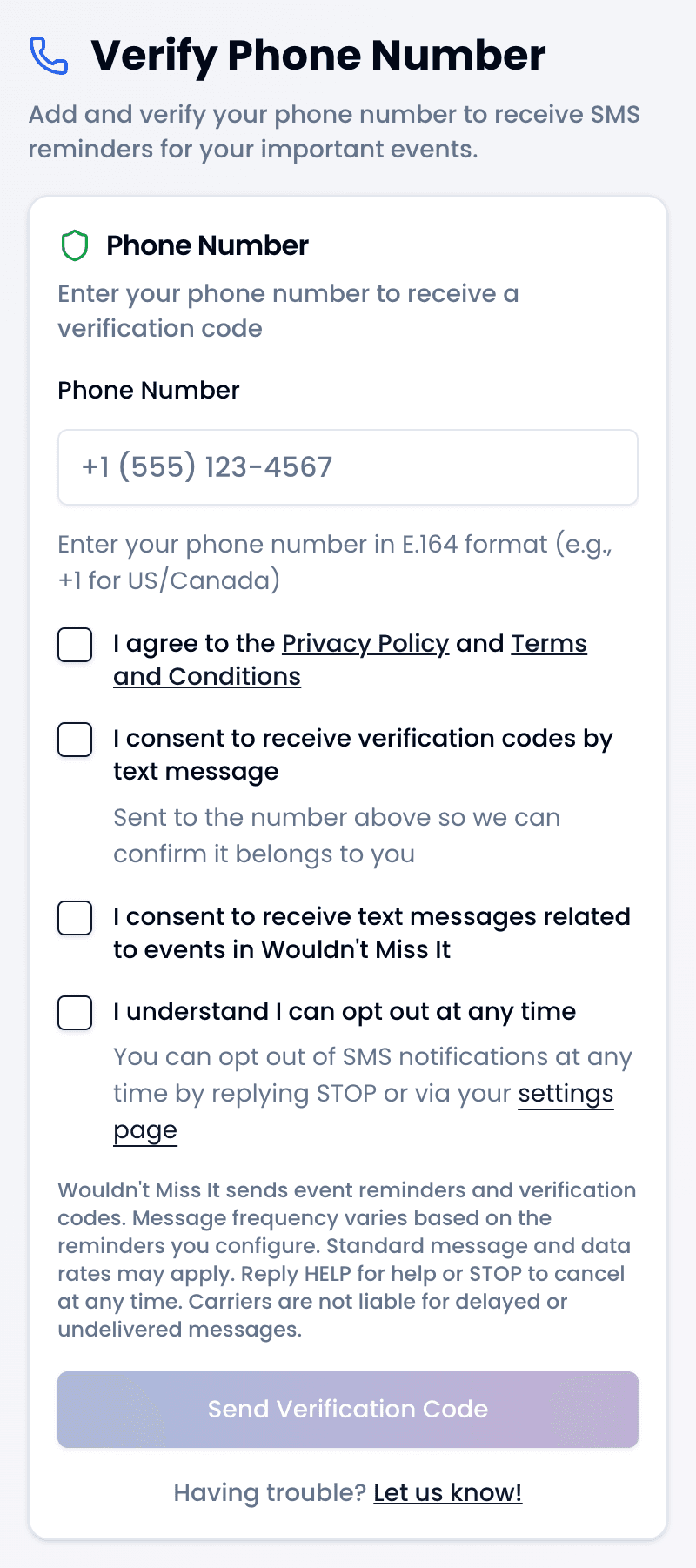
The consent screen. Every box starts unchecked. - 4
Confirm ownership of the number
Only after consent is given — including explicit consent to the verification message itself — do we send a single message containing a six-digit code, which expires after ten minutes. This confirms the person consenting actually holds the number, making the opt-in a double opt-in.
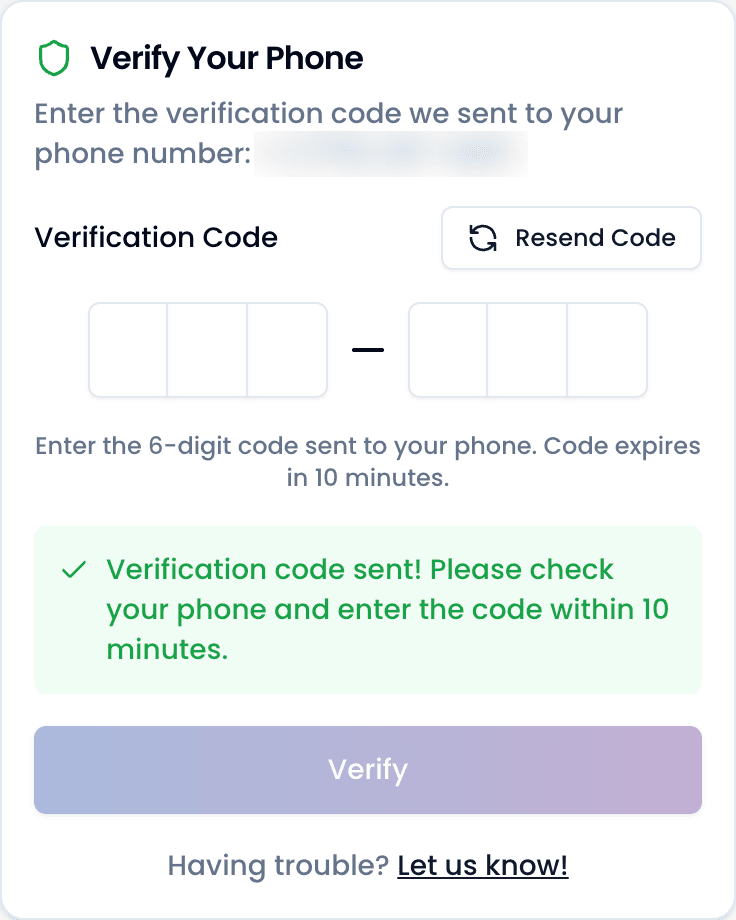
Entering the verification code sent by SMS. - 5
Consent is recorded and confirmed
Once the code is confirmed, the consent is stored with the mobile number, a timestamp, the full consent text shown below, and the version of the Privacy Policy and Terms in force at that moment. We then send one confirmation message so the user has a record of what they signed up for and how to stop. Reminders begin only from this point.
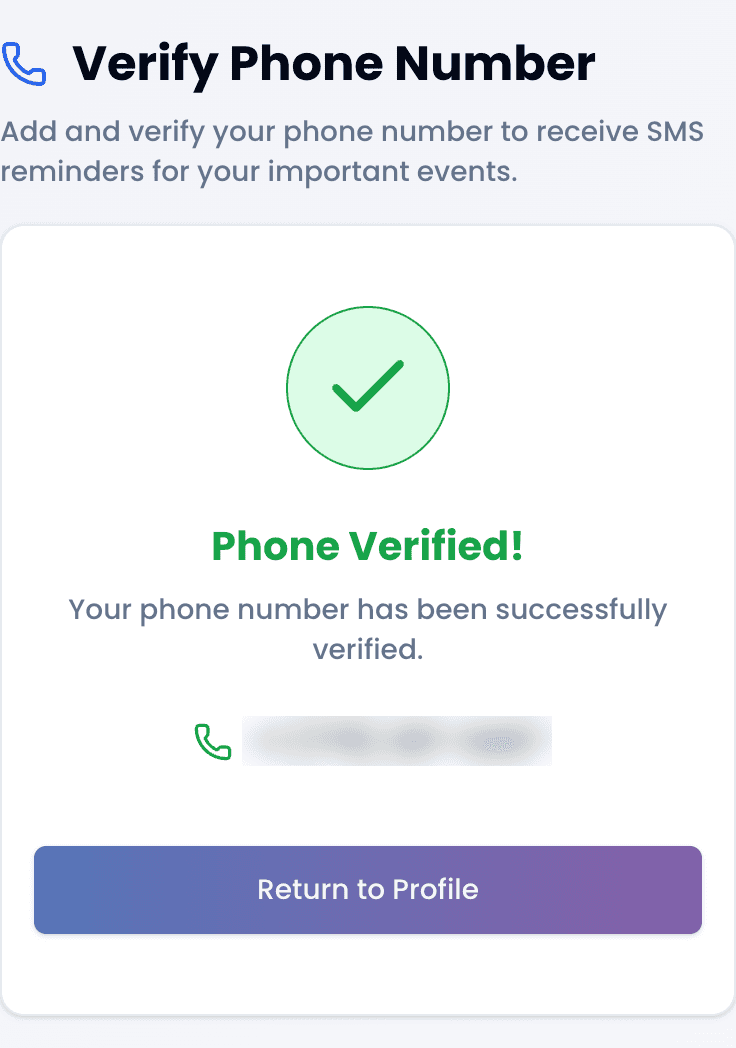
Verification complete — consent is now on record.
3. RECORDED CONSENT LANGUAGE
This is the exact text stored against every SMS consent record:
By providing my phone number I consent to receive verification codes by text message at that number. I consent to receive text messages related to events in Wouldn't Miss It, for the reminders I have designated in my account. I understand that I can opt out at any time by replying STOP or via my settings page. I agree to the Privacy Policy and Terms and Conditions. Wouldn't Miss It sends event reminders and verification codes. Message frequency varies based on the reminders you configure. Standard message and data rates may apply. Reply HELP for help or STOP to cancel at any time. Carriers are not liable for delayed or undelivered messages.
4. SAMPLE MESSAGES
Verification message
Sent once, immediately after consent is given.
Your Wouldn't Miss It verification code is 123456
Opt-in confirmation
Sent once, immediately after the number is verified.
Wouldn't Miss It: You're set up for event reminders. Msg frequency varies. Standard message and data rates may apply. Reply HELP for help, STOP to cancel.
Event reminder
The recurring message type. Every reminder ends with opt-out instructions; if a user has many events, the list is shortened before the opt-out line is ever dropped.
Wouldn't Miss It: 3 upcoming events
- Mom's Birthday (Tomorrow!)
- Wedding Anniversary (In 3 days!)
- Dentist Appointment (Today!)
Reply STOP to opt out.
5. OPTING OUT AND GETTING HELP
By text message
Replying with any of the following keywords to any message stops all further messages immediately:
- STOP
- STOPALL
- UNSUBSCRIBE
- CANCEL
- END
- QUIT
- REVOKE
- OPTOUT
- HALT
Opt-out is honored in two independent places. Replying STOP blocks further messages at the carrier level, outside our control. Separately, our own system deactivates the consent record and switches SMS notifications off on the account for every keyword listed above, so no further messages are generated even where the carrier does not block them.
Our sender is a toll-free number, so the confirmation a user receives after replying STOP is generated by the carrier network rather than by us, and reads:
NETWORK MSG: You replied with the word "stop" which blocks all texts sent from this number. Text back "unstop" to receive messages again.
This is the last message a user receives. We send nothing further unless they opt back in.
As a further safeguard, if a carrier rejects a message because the recipient has opted out, we record the opt-out from that delivery failure as well, so our records cannot drift out of step with the carrier.
In the app
Users can also turn off SMS notifications at any time from their account settings, without sending a text message.
Opting back in
Replying START or UNSTOP lifts the carrier-level block, and the carrier replies:
NETWORK MSG: You have replied "unstop" and will begin receiving messages again from this number.
That message is generated by the carrier and we cannot change it. Lifting the block makes the number reachable again, but it does not restart reminders on its own: we record the keyword and leave the consent record inactive, because resuming requires a fresh consent rather than a keyword. So that nobody is left expecting messages that will not arrive, we reply once:
Wouldn't Miss It: your number is unblocked, but event reminders are still off. Verify your number at https://www.wouldntmissit.com/verify-phone to restart them.
We send this at most once per opt-out, and only to numbers that previously opted out of our messages. Repeating the keyword does not produce another reply, and an opt-in keyword from any other number receives no reply at all. To receive reminders again, a user verifies their phone number through the workflow above, which records a fresh consent.
Help
Replying HELP returns support contact information. A user who has already opted out will not receive a reply to HELP until they opt back in, because the carrier block on a toll-free number applies to every message from the sender.
Wouldn't Miss It Support: email info@wouldntmissit.com. Msg frequency varies. Msg & data rates may apply. Reply STOP to cancel.
Support is available at any time, without sending a text message, at info@wouldntmissit.com.
6. RELATED POLICIES
Full details are set out in our Privacy Policy and in the SMS Text Messaging section of our Terms and Conditions.